


Understanding and Setting Up OpenVPN — Secure Your Network

Everyday browsing isn’t the same as safe browsing anymore. Between public Wi-Fi, remote work, cloud dashboards, and accounts that follow you across devices, your traffic regularly travels through networks you don’t control. That doesn’t mean the internet is “doomed,” but it does mean the default path is often exposed: your ISP can observe metadata, trackers can build profiles, and unsecured hotspots can invite interception attempts.
This is why VPNs have shifted from “nice to have” to practical hygiene for many people. And for users who care about security properties—not just a brand name—OpenVPN remains a widely used standard. It’s flexible, well-understood, and designed around proven cryptography principles, making it a strong option when you want control and clarity rather than a black box.

VPN Fundamentals — Understanding the Basics
What Is a VPN?
A VPN (Virtual Private Network) creates an encrypted “tunnel” between your device and a VPN server. Instead of sending traffic directly to the internet through whatever network you’re on, your device encrypts the traffic first, then sends it through the tunnel to the VPN server. The VPN server decrypts it and forwards it to the destination (a website, app API, or internal system). Responses come back the same way, encrypted in transit.
The key idea is the encrypted tunnel: it reduces the risk of local network snooping (like public Wi-Fi), and it can also change the apparent source of your traffic on the public internet (because the destination sees the VPN server as the origin). For businesses, a VPN can also function as a secure bridge into internal resources that should not be publicly accessible.
Common VPN Use Cases
- Personal privacy on untrusted networks: Protecting traffic on hotel, airport, or café Wi-Fi where you can’t verify who’s watching.
- Remote access for teams: Reaching internal services (admin panels, private APIs, file servers) without exposing them to the public internet.
- Safer device-to-cloud access: Adding a hardened layer when accessing cloud consoles and dashboards.
- Light geo-routing needs: In some cases, routing traffic through a different region (mention-worthy, but not the primary security reason).
Why OpenVPN? Understanding the Core Benefits
Understanding the Basics and Benefits of OpenVPN
OpenVPN is popular with security-focused users because it’s open source, broadly supported, and highly configurable. That combination matters. When software is widely deployed and heavily examined, configuration mistakes become the bigger risk—not the underlying protocol. OpenVPN gives you options to meet different threat models and network environments, whether you’re connecting a single laptop or supporting a distributed team.
It’s also cross-platform. You can use OpenVPN clients across common desktop and mobile environments, which makes standardizing your “secure access” experience easier for families, founders, and small teams.
Why OpenVPN Is a Best Choice for Security-Focused Users
At a high level, OpenVPN can use strong encryption and TLS-based authentication. In plain terms, it can encrypt data robustly and verify that both sides are legitimate before any sensitive traffic flows. It also supports certificate-based trust, which is one of the cleanest ways to manage who is allowed to connect—especially in business scenarios where “shared passwords” become a liability.
If you want a VPN approach that can be audited, configured deliberately, and maintained like infrastructure, OpenVPN is often the starting point.

VPN Protocols Compared — OpenVPN vs Others
Secure and Effective VPN Protocols Compared
Not all VPN protocols are created equal. Some older protocols are fast to set up but come with security weaknesses or design trade-offs that no longer fit modern threats.
- PPTP: Historically simple and sometimes fast, but generally considered outdated and weaker against modern attacks. It’s typically not recommended if security is the goal.
- L2TP/IPsec: Can be acceptable in some environments, often easier to deploy on certain systems, but can be less flexible for tricky networks and may be more likely to face connectivity issues behind strict NAT/firewalls.
- OpenVPN: Flexible, mature, and widely deployed. Often chosen when you need a balance of security, compatibility, and configurability.
Key Differences in Security, Speed, and Flexibility
The real-world difference usually comes down to three factors: how the protocol authenticates, how it encrypts, and how reliably it works through “messy” networks. OpenVPN’s strength is that it can be tuned for different requirements (performance, compatibility, control), while maintaining strong security assumptions when configured responsibly.
If you’re setting up a VPN for sensitive access (work systems, private admin, personal privacy on unknown networks), defaulting to a modern, well-supported option is typically safer than choosing the quickest setup path.
How OpenVPN Works Under the Hood (Without the PhD)
OpenVPN TLS — The Secure Core
OpenVPN commonly uses TLS (the same family of security used to protect HTTPS websites) to establish trust and negotiate encryption keys. Think of it as a secure handshake: before any data is exchanged, the client and server prove who they are and agree on how to encrypt traffic.
This matters because strong encryption without strong authentication is incomplete. TLS helps ensure you are connecting to the real server, not an impostor.
Understanding OpenVPN Security Components
- Asymmetric encryption (public/private keys): Used for identity and secure handshakes. It helps verify “who is who.”
- Symmetric encryption: Used for the bulk data transfer once the tunnel is established, because it’s efficient.
- Key exchange (often Diffie–Hellman style concepts): Allows both sides to agree on secret session keys without sending those keys in plain text.
- PKI basics (certificates): A structured way to issue and revoke trust. In practice, it means you can approve devices/users and also remove access cleanly later.
You don’t need to memorize the cryptography to deploy OpenVPN well. The practical takeaway is that OpenVPN can be built around certificates and controlled trust, which is exactly what you want when “who can connect” is the real security question.
Designing an OpenVPN Architecture
Bridging vs Routing — Which One Should You Choose?
Two common VPN designs are bridging and routing. Bridging makes VPN clients behave more like they are on the same local network segment as the server. Routing creates a separate VPN subnet and routes traffic between the VPN subnet and your internal network.
- Routing: Usually simpler, more scalable, and easier to manage. It tends to be the default choice for many modern setups.
- Bridging: Useful in specific scenarios where you truly need layer-2 behavior, but it can be more complex and sometimes less friendly to large or multi-site setups.
If you’re unsure, routing is typically the practical starting point: it’s predictable and easier to secure with firewall rules.
Hardware vs Software Solutions
You can run OpenVPN in several ways depending on your comfort and operational needs:
- Self-hosted: Maximum control, but you own patching, monitoring, and uptime.
- Cloud VPS: A common middle ground: predictable costs, stable connectivity, and you still control configuration.
- Firewall appliances: Useful for businesses that already manage network gateways and want VPN integrated into network policy.
Server Preparation: Plan Before You Install
Self-Hosting vs Renting a VPN Server
Self-hosting can be great if you already maintain servers and want full control. Renting a VPS is often easier for reliability and bandwidth. The trade-off is operational responsibility: whichever route you choose, you must keep the system updated and properly secured, because a VPN server is security-critical infrastructure.
Preparing Your Environment (Ubuntu Example)
- OS readiness: Use a supported OS version and keep it patched.
- Firewall policy: Open only the necessary VPN port(s). Close everything else by default.
- Network planning: Decide your VPN subnet and what internal resources VPN users can reach.
Practical Guide: Setting Up an OpenVPN Server (Step-by-Step)
This is the “do it” section. The exact commands can vary depending on whether you use a packaged installer, a managed distribution, or a manual build. The steps below stay consistent across most setups.
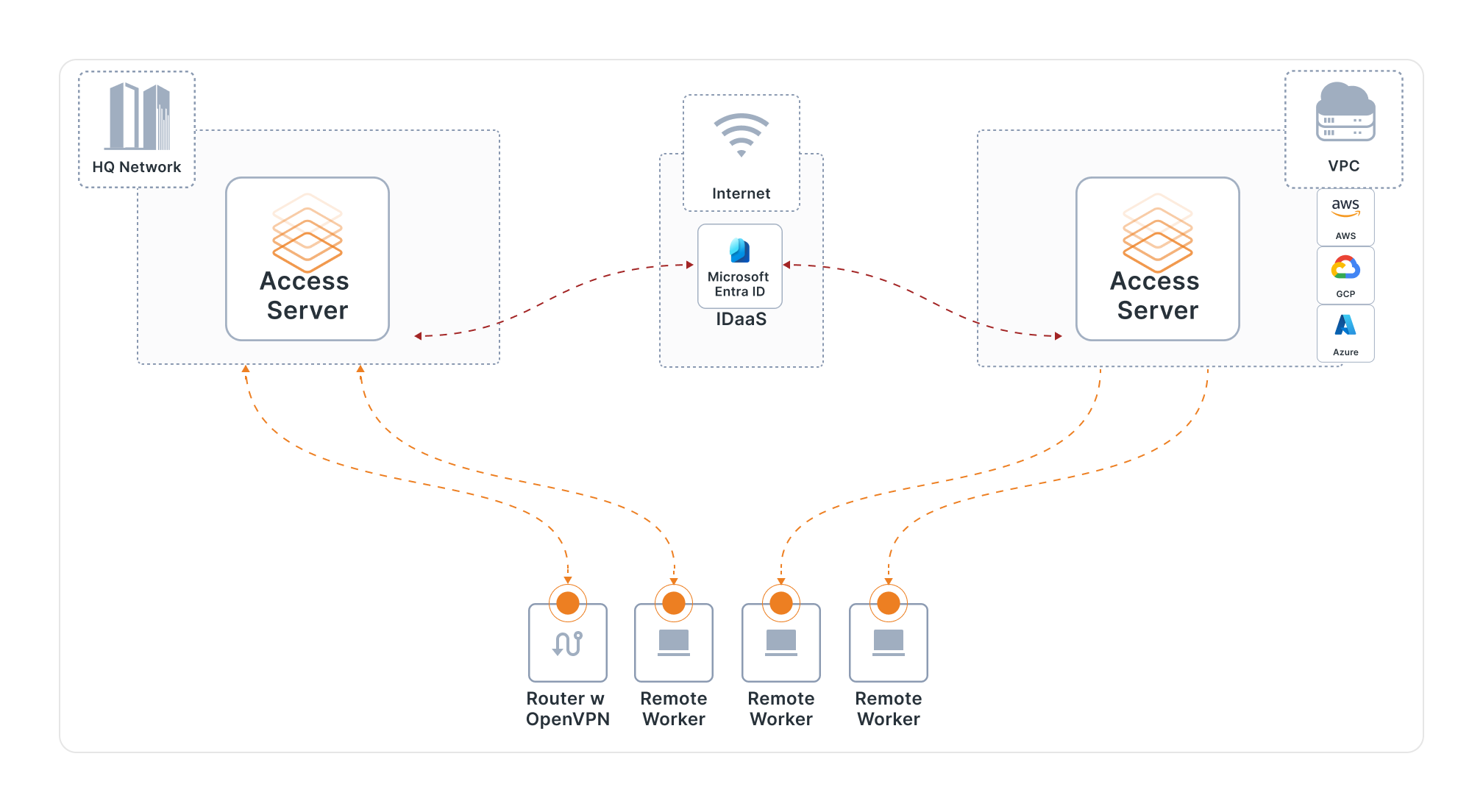
Setting Up an Effective OpenVPN Server in 8 Steps
- Install OpenVPN and required tools: Use your OS package manager or trusted installation method.
- Create a Certificate Authority (CA): The CA issues and signs certificates you trust.
- Generate server certificates and keys: This identifies your VPN server and supports secure handshakes.
- Configure encryption and TLS settings: Choose strong defaults and avoid legacy options unless required by a constraint.
- Configure networking and firewall: Enable routing, set NAT rules if needed, and restrict access to only what users should reach.
- Create user credentials (certificates/keys): Issue unique client credentials so you can revoke one user without breaking everyone.
- Generate .ovpn client profiles: Bundle the correct endpoint, certificates, and settings for easy client import.
- Start the service and verify: Confirm the tunnel connects, traffic routes correctly, and DNS behaves as intended.
If you want a smoother path with fewer footguns, many security-conscious users start with a guided setup approach and then harden configuration over time. Regardless of how you deploy it, the goal is the same: predictable authentication, strong encryption, and controlled access.
Client Setup: Connecting Securely
Securely Transferring OVPN Files
Your client profile (.ovpn) and any embedded certificates are effectively “keys to the house.” Treat them like credentials, not like casual files. Avoid sending them over insecure channels. Use secure file transfer, encrypted sharing tools, or a controlled internal system. If a profile is exposed, revoke that client certificate and issue a new one.
OpenVPN Client Setup by Platform
- macOS: Install a trusted OpenVPN client, import the .ovpn profile, connect, and verify your IP/DNS behavior.
- iOS: Use a reputable OpenVPN-compatible client app, import the profile via secure transfer, and enable “connect on demand” if appropriate.
- Windows/Linux (optional): Import the same profile and test connectivity; keep configurations consistent across devices to reduce troubleshooting.
After connecting, validate the basics: can you reach allowed internal resources, are blocked resources truly blocked, and is your DNS resolving as expected? VPN issues often appear first as DNS confusion, not as total connection failure.
VPN Security Best Practices
Basics of VPN Security Explained Simply
- Key management: Issue unique client credentials and rotate/revoke when needed.
- Access control: Give users only the network access they need, not a blanket internal pass.
- Logging and monitoring: Track connection events and failures without collecting unnecessary sensitive browsing data.
- Updates: Patch the OS and VPN software promptly. Vulnerabilities matter more on gateways.
Common Mistakes to Avoid
- Weak or outdated settings: Avoid legacy protocols or weak encryption choices just for convenience.
- Shared certificates: Sharing one credential across multiple users eliminates accountability and makes revocation painful.
- Overly permissive firewall rules: A VPN should reduce exposure, not widen it.
- “Set and forget” servers: Security tools require maintenance. A neglected VPN server becomes a risk.
When OpenVPN Makes the Most Sense
OpenVPN is a strong fit when you want a security-first VPN that you can control and maintain responsibly. It’s especially useful for:
- Privacy-first individuals who regularly use public networks and want consistent protection.
- Organizations with sensitive access needs that require auditable authentication and controlled internal connectivity.
- Developers and IT admins who need a predictable way to reach private environments and services.
If your main goal is “one tap and forget forever,” a consumer VPN subscription may be simpler. If your goal is secure access you can reason about and manage, OpenVPN becomes more compelling.
Course Wrap-Up: What You’ve Learned
You now understand what a VPN is, why OpenVPN remains relevant, how it compares to older protocols, and how an OpenVPN setup is built around TLS trust, certificates, and controlled routing. You also have an implementation blueprint: prepare the environment, deploy deliberately, issue unique client credentials, and operate the VPN like real infrastructure.
Over time, your biggest upgrades will come from tightening access policies, improving monitoring, and building a clean credential lifecycle so you can add or remove users without drama. If you want a VPN that can grow with your needs, OpenVPN is a practical place to build from.
Frequently Asked Questions (FAQ)
What is OpenVPN?
OpenVPN is a VPN solution and protocol that can create an encrypted tunnel between a client and a server, commonly using TLS authentication and certificate-based trust for secure connectivity.
Why choose OpenVPN over PPTP or L2TP/IPsec?
PPTP is generally considered outdated for security-focused use. L2TP/IPsec can work, but OpenVPN is often chosen for its flexibility, broad compatibility, and strong security posture when configured correctly.
Is OpenVPN fast?
Performance depends on server resources, network quality, and configuration. With modern hardware and sensible settings, OpenVPN is fast enough for most business and personal workflows, especially where security is a priority.
Is OpenVPN suitable for businesses?
Yes. Businesses often use OpenVPN-style deployments to provide secure remote access to internal tools, especially when they want certificate-based authentication and controlled network access.
How secure is OpenVPN encryption?
When deployed with strong, modern settings and good key management practices, OpenVPN can provide robust encryption and authentication. In most real deployments, configuration discipline matters as much as the underlying cryptography.
Final Thoughts
If your security needs are real—remote work access, sensitive accounts, or frequent public Wi-Fi—building a VPN you understand is a powerful step. OpenVPN is especially compelling because it’s designed for trust, control, and long-term maintainability, not just quick installation. If you want to go from “I hope I’m safe” to “I know how this is secured,” exploring OpenVPN and setting it up properly is a meaningful upgrade.


