


How EaseUS Recover Lost and Deleted Files Safely


Data loss rarely happens at a convenient time. A deleted folder, a corrupted drive, or an accidental format can instantly erase years of work, memories, or business-critical files. For most users, the panic comes not from the mistake itself, but from the fear that the data is gone forever.
This is where EaseUS Data Recovery becomes relevant. Designed to recover deleted and lost data from a wide range of devices, EaseUS focuses on making data recovery accessible without requiring deep technical knowledge.
This article explores how EaseUS Data Recovery works, what types of data it can recover, and why it is often considered a reliable solution when files disappear unexpectedly.

Why Data Loss Happens More Often Than You Think
Data loss is not limited to hardware failure. In reality, most cases are caused by everyday actions.
Common scenarios include:
- Accidentally deleting files or emptying the recycle bin
- Formatting a hard drive or USB flash drive
- Corrupted file systems after improper shutdowns
- Virus or malware attacks
- Memory card errors in cameras and mobile devices
In many of these cases, the data still exists on the device but is no longer visible to the operating system.
How Data Recovery Software Actually Works
When files are deleted, they are usually not erased immediately. Instead, the system marks the storage space as available for reuse.
Data recovery software scans storage devices at a low level, searching for file signatures and metadata that indicate recoverable content.
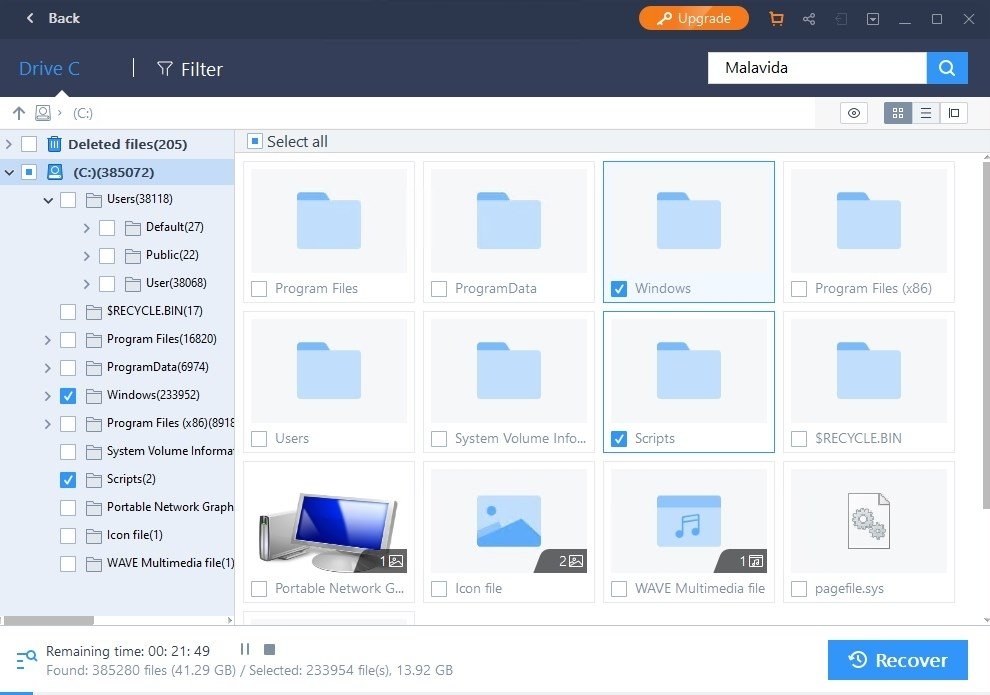
EaseUS Data Recovery automates this process, allowing users to scan, preview, and recover files with minimal risk.
:quality(75)/2018_2_8_636536550572191479_EaseUS-Data-Recovery-Wizard.jpg)
Devices Supported by EaseUS Data Recovery
One of the strengths of EaseUS is its broad device compatibility.
The software supports data recovery from:
- Internal HDDs and SSDs
- External hard drives
- USB flash drives
- SD and microSD cards
- Digital cameras and removable storage devices
This flexibility makes it suitable for both personal and professional use cases.
Types of Files You Can Recover
EaseUS Data Recovery is designed to handle a wide variety of file formats.
Recoverable file types include:
- Documents such as PDFs, Word files, and spreadsheets
- Photos and images from cameras and phones
- Videos in common formats
- Audio files
- Compressed archives
Preview functionality allows users to verify file integrity before completing recovery.
Ease of Use for Non-Technical Users
Data recovery is often perceived as a technical task. EaseUS challenges this assumption through a guided interface.
The recovery process typically involves:
- Selecting the affected device
- Running a quick or deep scan
- Previewing found files
- Recovering selected data to a safe location
This workflow reduces the risk of accidental mistakes during recovery.
Safety and Data Integrity Considerations
Recovering data incorrectly can overwrite existing information and reduce recovery chances.
EaseUS emphasizes read-only scanning, meaning the software does not modify the original storage during analysis.
This approach helps preserve remaining data while recovery decisions are made.
When EaseUS Is the Right Choice
EaseUS Data Recovery is particularly useful for:
- Accidental deletions
- Formatted drives
- Corrupted partitions
- Lost files on removable media
It is not designed to repair physically damaged hardware, which requires professional recovery services.
Personal and Professional Use Cases
Individuals often use EaseUS to recover personal photos, videos, or documents.
Professionals may rely on it to restore business files, project assets, or client data after unexpected loss.
The ability to recover data from multiple device types makes EaseUS Data Recovery adaptable across different environments.
Final Thoughts
Data loss is stressful, but it does not always mean permanent loss.
With a structured recovery approach and broad device support, EaseUS Data Recovery offers a practical way to retrieve deleted and lost files without specialized expertise.
FAQ
Can EaseUS recover files from a formatted drive?
Yes. The software can scan formatted drives and recover files if they have not been overwritten.
Is EaseUS Data Recovery safe to use?
Yes. It uses read-only scanning to avoid modifying original data.
Does it work with external drives?
Yes. External HDDs, SSDs, USB drives, and memory cards are supported.
Can I preview files before recovery?
Yes. Preview helps confirm file integrity before restoring data.
Is technical knowledge required?
No. The interface is designed for non-technical users.


