


HOZO Design Tools For Smarter Creative Work

Creative work often depends on small details. A measurement that is slightly off, a layout that is hard to capture, or a material cut that lacks control can slow down an entire project.
HOZO Design focuses on tools built for people who care about precision, portability, and better workflows. Its product direction fits creators, interior planners, designers, architects, crafters, DIY users, and makers who want smarter ways to measure, plan, and build.
Instead of treating creative tools as basic accessories, HOZO Design positions them as productivity upgrades. The goal is to help users move from rough estimates to cleaner, more confident execution.
This guide explains how HOZO Design tools can support smarter creative work, where products like digital measuring tools and ultrasonic cutters fit into a workflow, and what buyers should consider before choosing the right tool.

Why Precision Tools Matter for Creative Projects
Many creative projects look simple until the details begin to stack up. Measuring a room, planning a layout, cutting craft material, preparing a model, or organizing a DIY build all require accuracy.
When the tools are slow or inconsistent, the whole workflow feels harder. Better tools can reduce repeated checking, wasted material, and guesswork.
Accuracy saves time
Accurate measurement and clean cutting help users avoid rework. A project can move faster when the first measurement is reliable and the first cut is closer to the intended result.
This is especially important for people working with limited materials, client deadlines, room layouts, product prototypes, or design samples.
Portability supports real-world work
Creative work does not always happen at a desk. Designers may measure rooms, makers may work in studios, and DIY users may move between surfaces, shelves, furniture, and materials.
Portable tools make it easier to capture information and complete tasks where the work actually happens.
Workflow matters as much as the tool
A good tool should not only perform one task well. It should fit into the user’s broader workflow, from planning to measuring, editing, cutting, checking, and finishing.
That is where HOZO Design’s product style can appeal to people who want modern tools that feel practical and thoughtfully designed.
What HOZO Design Offers Makers and Designers
HOZO Design is known for smart design tools, including digital measuring solutions and creative hardware for precision work. The brand has appeared in maker and design communities through products built around measurement, layout, and material handling.
For buyers, the useful question is not only what the tool does. It is how the tool improves the way a project moves from idea to finished result.
Digital measuring for layouts
Digital measuring tools are useful for people who need to capture room dimensions, furniture spacing, wall lengths, floor plans, or object sizes. They can help reduce manual measuring friction, especially when working alone.
For interior design, renovation planning, staging, or furniture shopping, better measurement can make decisions easier and more confident.
Smart tools for modern makers
Modern maker workflows often combine physical material with digital planning. A tool that helps measure, map, or capture dimensions can support cleaner project documentation.
That can be valuable for designers who move between sketching, modeling, quoting, shopping, and building.
Precision cutting for craft and prototyping
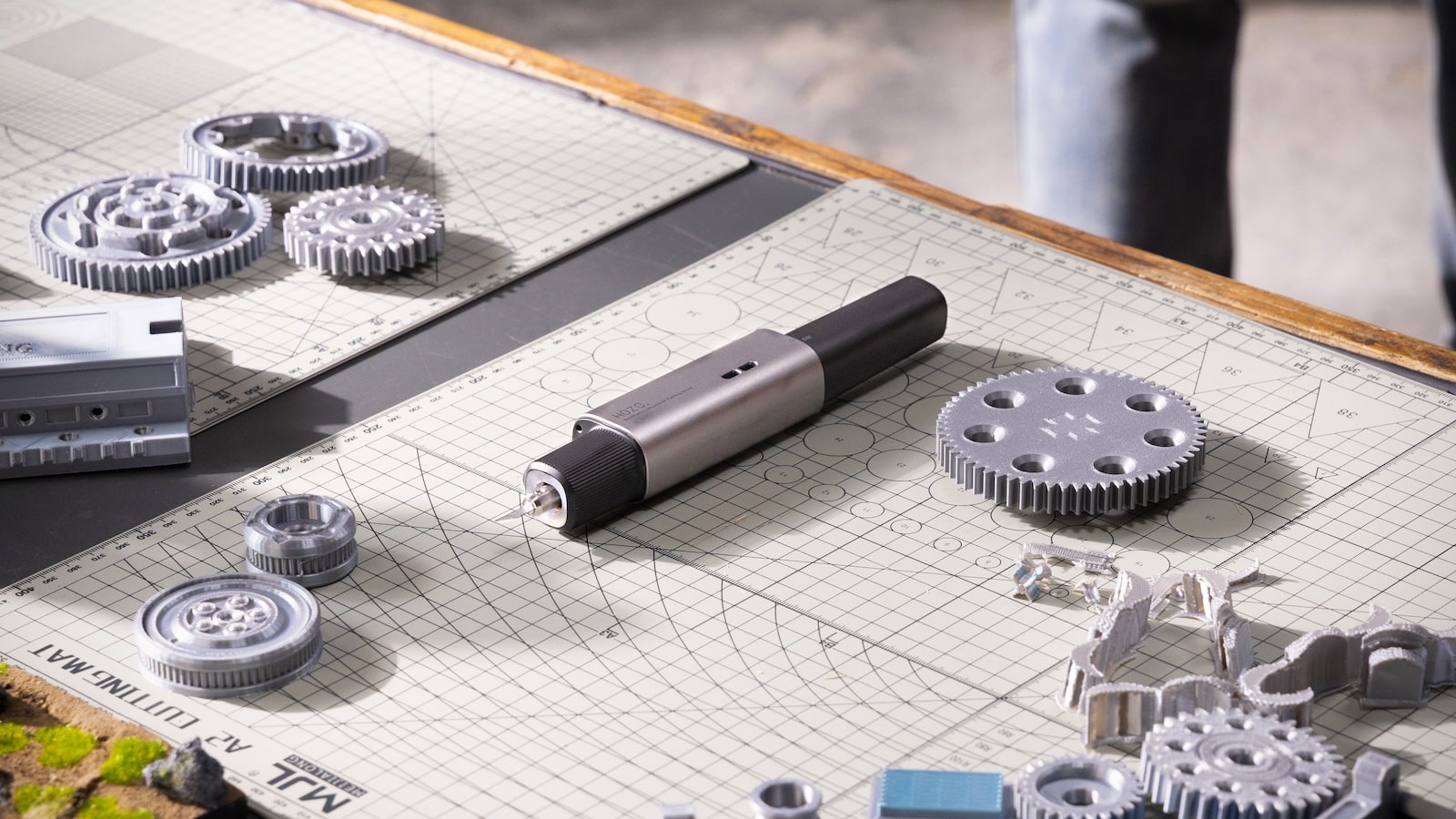
Ultrasonic cutting tools such as NeoBlade are designed for users who need cleaner, more controlled cutting on suitable materials. This can be useful for craft work, model making, packaging samples, foam, plastic sheet projects, and creative prototypes.
As with any cutting tool, users should follow the product’s safety instructions and material guidance carefully.

How Digital Measuring Tools Improve Planning
Good planning starts with reliable measurements. Whether someone is renovating a room, choosing furniture, planning a gallery wall, or preparing a client concept, the measurement stage affects every next decision.
Digital tools can make that stage easier when they reduce manual errors and help users capture information more efficiently.
Room planning becomes easier
Measuring rooms by hand can be slow, especially when walls, corners, furniture, and fixtures need to be recorded. A smarter measuring tool can help users capture dimensions and create a clearer planning base.
This is helpful for interior decorators, renters planning furniture, homeowners preparing renovations, and professionals making quick site notes.
Furniture decisions become more practical
Many furniture mistakes happen because a shopper underestimates space. A sofa may fit on the website but not in the room. A shelf may look right but block a walkway.
Better measurement helps shoppers and designers compare product dimensions against real spaces before buying.
Client work feels more professional
For designers and service providers, accurate measurement creates better proposals, cleaner communication, and fewer revisions. Clients feel more confident when the planning process looks organized.
A tool from HOZO Design can support that professional workflow by helping users work with clearer information.
| Use case | Why measurement matters | Helpful outcome |
|---|---|---|
| Interior planning | Room size and furniture spacing | Better layouts |
| Renovation | Walls, fixtures, materials | Cleaner estimates |
| Furniture shopping | Product dimensions vs room space | Fewer fit issues |
| Client proposals | Accurate site details | More professional planning |
Where NeoBlade Fits in a Maker Workflow
Cutting is one of the stages where control matters most. When materials are delicate, layered, or shaped for a prototype, rough cutting can reduce the quality of the finished piece.
NeoBlade-style ultrasonic cutting can be useful when makers want a more precise cutting experience for suitable materials.
Useful for craft and model making
Crafters, hobbyists, and model makers often work with materials that need careful shaping. A controlled cutting tool can help improve edges, reduce drag, and make detailed work feel easier.
This can be especially helpful when building samples, props, foam models, packaging ideas, or design mockups.
Helpful for prototyping
Product designers and makers often need to test shapes before final manufacturing. A precision cutter can make early prototyping more flexible because users can adjust physical materials quickly.
Fast, controlled iteration helps creative teams learn from the material instead of only from digital sketches.
Material compatibility still matters
No cutting tool is universal. Buyers should always review which materials the product is intended to cut and follow HOZO Design’s usage guidance.
Checking material compatibility before purchase helps ensure the tool fits the projects the buyer actually wants to make.
How to Choose the Right HOZO Design Tool
The right HOZO Design product depends on the user’s workflow. Some buyers need better measurement. Others need cleaner cutting. Some may benefit from combining both across planning and making.
Start with the task you repeat most often.
Choose measuring tools for planning-heavy work
If your work involves rooms, furniture, layouts, renovation, staging, or object dimensions, measurement should come first. Better measurement improves decisions before any material is cut or purchased.
This is the better starting point for interior designers, decorators, homeowners, real estate professionals, and space planners.
Choose cutting tools for material work
If your work involves craft materials, models, prototypes, foam, sheets, or detailed physical shaping, a precision cutter may be the more useful purchase.
This fits makers who spend more time building and refining physical objects.
Choose by project frequency
A premium creative tool makes the most sense when it is used repeatedly. If you measure rooms weekly, a smarter measuring tool can save time. If you cut materials often, a precision cutter can improve workflow quality.
Frequent use is what turns a specialized tool into a practical investment.
A Practical HOZO Design Buying Checklist
Before choosing a HOZO Design tool, use a simple checklist. It helps match the product to real projects instead of buying based only on novelty.
- What task do you repeat most often: measuring, planning, cutting, or prototyping?
- Will the tool improve accuracy or save time in that task?
- Does the product support the materials or spaces you work with?
- Is the tool portable enough for your workflow?
- Do you understand the maintenance, charging, or replacement accessory needs?
- Will the product be used often enough to justify the purchase?
- Does the tool fit your current creative process?
Start with one high-impact workflow
Most users do not need every tool at once. Start with the product that solves the clearest bottleneck in your work.
A designer may begin with measurement. A maker may begin with cutting. The best choice is the tool that removes the most friction from your current projects.
Who Should Consider HOZO Design
HOZO Design is a strong fit for people who want creative tools that feel modern, portable, and useful for detail-driven work. It is especially relevant for users who regularly measure, plan, cut, build, or prototype.
The brand can fit several types of buyers.
- Interior designers and space planners.
- DIY users working on home projects.
- Makers building craft, model, or prototype pieces.
- Architects and renovation planners capturing dimensions.
- Product designers testing shapes and materials.
- Creative professionals who value portable precision tools.
Ready to make your creative projects more precise and easier to plan?
Final Thoughts
HOZO Design is worth considering for people who want smarter tools for measuring, planning, cutting, and making. Its products are especially relevant when creative work depends on accuracy, portability, and better control over details.
The best way to choose is to start with the workflow that slows you down most. If measurement causes friction, choose a measuring solution. If material cutting is the challenge, look at precision cutting tools such as NeoBlade.
Use HOZO Design to upgrade your creative workflow if you want tools that support cleaner planning, better measurement, and more controlled maker projects.
FAQ
What is HOZO Design best for?
HOZO Design is best for smart creative tools that support measuring, planning, DIY work, craft projects, and precision maker workflows.
Who should consider HOZO Design tools?
Designers, makers, DIY users, architects, space planners, and creative professionals can benefit from tools that improve accuracy and workflow control.
What is NeoBlade used for?
NeoBlade is an ultrasonic cutting tool designed for controlled cutting on suitable materials, especially for craft, model making, and prototyping workflows.
How should I choose the right HOZO Design product?
Start with your main workflow problem. Choose measuring tools for planning-heavy work and cutting tools for material-heavy creative projects.
We only recommend tools we've tested and trust. This post may include affiliate links, meaning we may earn a commission if you choose to purchase - at no extra cost to you.


