


Surfshark VPN Review: Everyday Online Privacy Made Simple

Most people picture “online privacy” as a problem for cybersecurity experts or people with something to hide. That mindset is outdated. Privacy loss today is rarely dramatic. It is routine, quiet, and built into how the internet works.
When you connect to public Wi-Fi, your traffic can be exposed. When you browse regular websites, trackers build profiles around your behavior. When you use home internet, your ISP may log metadata about where your traffic goes. Then there are data brokers—companies that compile and sell consumer information, often sourced from seemingly harmless digital breadcrumbs.
None of that requires a hacker. It happens during normal life: checking email at an airport, opening a shopping site, streaming content at a hotel, or signing into accounts from a café.
A modern VPN is not a “tech tool.” It is a practical layer of protection for everyday browsing. That is also where Surfshark positions itself: simple apps, broad device coverage, and privacy features designed for normal users, not just specialists.

![]() Everyday Browsing Is Not the Same as Safe Browsing
Everyday Browsing Is Not the Same as Safe Browsing
Most online threats are not personal attacks. They are mass collection systems. Your data is valuable because it can be aggregated, categorized, and monetized. The risk is less about “someone targeting you” and more about your activity being captured by default.
Even when websites are encrypted, privacy can still leak through patterns: where you connect from, how often you visit certain services, and which networks you trust. Over time, those patterns form a map of your life—work routines, interests, travel habits, purchases, and the content you consume.
That is why privacy has become an everyday concern. You do not need to be famous, wealthy, or controversial to benefit from basic protection. You simply need to be online.
Where Everyday Users Lose Privacy Online
To understand why a VPN matters, it helps to name the common points where privacy gets diluted. These are not edge cases. They are the normal internet experience for most people.
Public Wi-Fi: convenient, but not private by default
Public networks are designed for access, not security. In hotels, airports, coworking spaces, and cafés, you share the same network environment with strangers. Depending on the setup, malicious actors may attempt to observe traffic, spoof hotspots, or intercept connections.
A VPN adds a protective tunnel between your device and the VPN server, which can reduce exposure when you are on untrusted networks. This is one of the most practical reasons everyday users choose a VPN—especially travelers and remote workers who rely on public Wi-Fi frequently.
Website tracking: the profile is the product
Tracking is not limited to ads. Many sites embed scripts and pixels that measure what you click, how long you stay, what you add to cart, and what you abandon. That data becomes part of a larger advertising ecosystem that follows you across the web.
Some tracking is “first-party” and used for site performance. Much of it is “third-party” and built for profiling. A VPN does not erase all tracking, but it can reduce certain forms of correlation and exposure, especially when combined with additional privacy tools.
ISP data logging: your connection can reveal patterns
Your internet service provider is the gateway between your home and the wider internet. Even when your traffic is encrypted, ISPs can still see connection patterns and domains you access, depending on the technologies involved and local practices.
For many people, the discomfort comes from the principle: your daily browsing should not be an asset someone can monitor, store, or monetize. A VPN helps by routing traffic through the VPN provider instead of sending it directly through your ISP in a way that exposes browsing patterns as clearly.
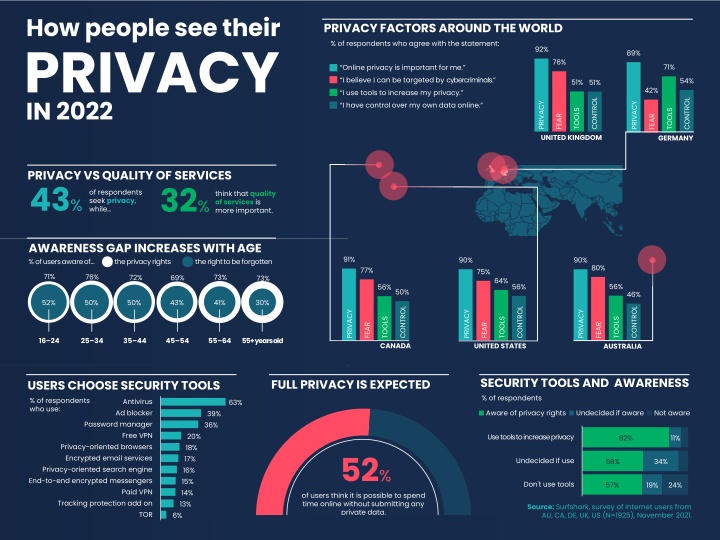
Data brokers: your digital crumbs get packaged and sold
Data brokers operate in the background economy of information. They compile consumer profiles using purchase behavior, location patterns, online identifiers, and more. The result is not “your secrets,” but a version of you that can be sold repeatedly.
This is one reason privacy tools are becoming mainstream. People are not trying to disappear. They are trying to reduce how easily their behavior can be harvested.
Why Most People Avoid VPNs (And What They Get Wrong)
If VPNs have been around for years, why don’t more people use them consistently? The answer is not that people do not care. The answer is friction—real and perceived.
“VPNs are complicated”
Old-school VPN setups could be confusing: manual configuration, server lists that felt abstract, and performance drops that made browsing annoying. That reputation sticks, even though modern consumer VPNs are often one-click apps.
“VPNs are only for tech people”
Many users assume VPNs exist for developers, gamers, or privacy extremists. In reality, the average VPN user today is a traveler, a remote worker, a student, or a family member trying to protect devices on shared networks.
“If I’m not doing anything wrong, I don’t need privacy”
This is the most common misunderstanding. Privacy is not about wrongdoing. It is about boundaries. You close the door to your home not because you are hiding crimes, but because your life deserves space. Online privacy is a similar concept: fewer unnecessary observers, fewer leaky channels, less passive collection.
“VPNs slow everything down”
A VPN can introduce some overhead, but the experience varies by provider, server quality, and location. Many users find the tradeoff acceptable, especially when the VPN is stable and easy to toggle. The best approach is to choose a VPN built for daily use, not one that feels like a tool you must fight.
What a Modern VPN Should Actually Do
A VPN is not just “an app that changes your location.” For everyday users, a modern VPN should meet a few practical requirements. If it fails these basics, it becomes something you install and forget—because it is not enjoyable to use.
| What matters | Why it matters for everyday users |
|---|---|
| One-click protection | Privacy tools must be easy, otherwise people stop using them. |
| Multi-device coverage | Your life is not one device. Phones, laptops, tablets, and TVs all connect. |
| Clear no-logs stance | A VPN should reduce exposure, not become another place where browsing is stored. |
| Reliable safety features | If the connection drops, protection should not silently disappear. |
| Practical extras | Ad and tracker blocking, clean browsing, and fewer interruptions improve daily use. |
In short, a modern VPN should feel like a seatbelt: not something you “operate,” but something that quietly protects you while you live your normal digital life.
How Surfshark Makes Online Privacy Simple
Surfshark is built around reducing friction. Its value is not only in encryption, but in usability—because usability is what turns privacy into a habit rather than a one-time experiment.
Easy apps that fit real-life routines
For many people, the best privacy tool is the one they actually use. Surfshark’s apps are designed for straightforward “connect/disconnect” behavior, which matches how most users think. You do not need to understand protocols or network theory to get started. When you want protection, you tap once. When you do not need it, you toggle it off.
Unlimited devices: privacy for your whole ecosystem
Modern households rarely have one device per person. Phones, work laptops, personal laptops, tablets, streaming devices, and shared family computers all come into play. Surfshark is known for offering unlimited device connections, which can make it easier to protect your entire setup without constantly choosing which device “deserves” privacy.
That is particularly helpful for families and remote workers who switch between devices throughout the day.
CleanWeb: fewer trackers, fewer annoyances
Most people do not wake up wanting to “block trackers.” They want fewer pop-ups, fewer intrusive ads, and a cleaner browsing experience. Surfshark includes a feature commonly referred to as CleanWeb, which aims to reduce ad and tracker exposure in a way that feels practical rather than technical.
This matters because privacy is not only about security. It is also about reducing the constant friction of modern browsing.
Kill Switch: protection that does not vanish quietly
One of the subtle risks with VPNs is what happens when a connection drops. Without safeguards, your device may revert to the regular connection, potentially exposing traffic you assumed was protected. A kill switch is designed to prevent that by cutting internet access if the VPN connection fails.
You do not need to think about it daily, which is the point. It is the kind of feature that matters most when you forget it exists.
Who Should Use Surfshark? Real-Life Use Cases
VPN advice gets abstract quickly. The simplest way to evaluate Surfshark is to map it to real situations. If these sound like your life, a VPN is less of a “security product” and more of a daily tool.

Remote workers who use cafés, coworking spaces, and hotel networks
Remote work often involves untrusted networks. Even if you are not handling sensitive data, your accounts, logins, and browsing patterns still deserve protection. Surfshark can help reduce exposure and give you more confidence when your workspace changes day to day.
Travelers who connect everywhere
Airports, hotels, and public transit hubs make connectivity easy and privacy difficult. Travelers are also more likely to use unfamiliar networks and shared devices. A VPN is one of the simplest ways to add a consistent layer of protection while moving.
Students balancing school, life, and shared internet
Students often live on shared Wi-Fi: dorms, shared apartments, campus networks. It is convenient, but it is not private. A VPN can help create a more secure baseline without requiring technical skill.
Families who want simpler privacy for multiple devices
Families often share devices and networks, and not everyone thinks about security equally. Unlimited devices and easy apps can make Surfshark a more practical choice for households where convenience determines whether a tool gets used at all.
How to Use a VPN Without Overthinking It
The best privacy strategy is the one you can sustain. For everyday users, the goal is not perfect anonymity. The goal is reducing unnecessary exposure with minimal effort.
- Turn it on for public Wi-Fi by default. If you build only one habit, build this one.
- Use it when signing into accounts on unknown networks. Banking, email, and work logins are common sense moments.
- Keep it simple. Pick a reliable server option and let consistency do the work.
- Combine with basic hygiene. Strong passwords and multi-factor authentication still matter.
If you want to check current plans or start with a straightforward setup, you can access Surfshark here: Surfshark.
Final Thoughts: Privacy Is Becoming Normal
Online privacy used to sound niche. Now it is part of mainstream digital life, because the everyday internet is built on tracking, profiling, and passive collection. The solution does not need to be dramatic. It needs to be usable.
A VPN is one of the simplest steps most people can take, especially when they rely on public networks or care about reducing data exposure. Surfshark is compelling for everyday users because it focuses on simplicity, broad device coverage, and practical features that improve daily browsing without making you feel like you are managing a complex security system.
Privacy is not about disappearing. It is about choosing what you share by default. If you want a straightforward starting point, Surfshark is built to make that choice easier.
FAQ
Do I need a VPN if I only browse “normal” websites?
Yes, because privacy loss often comes from tracking and network exposure, not from visiting risky sites. A VPN helps reduce how easily your activity can be observed on untrusted networks.
Will a VPN make my internet slower?
It can add some overhead, but experiences vary by provider and server quality. Many users find the impact small enough that the privacy tradeoff is worth it for daily use.
Is a VPN only for tech-savvy users?
No. Modern VPNs are designed for everyday people who want simple protection on public Wi-Fi, travel networks, and shared connections.
Can I use Surfshark on multiple devices?
Surfshark is known for supporting unlimited devices, which can be useful for families and people who switch between phone, laptop, and other devices daily.
What’s the easiest way to start using a VPN consistently?
Make it a habit on public Wi-Fi. Once that becomes routine, you can expand usage to other moments like travel, work sessions, and account logins.


